The Growing Importance of WhatsApp Profile Trust
In 2026, customers are more selective than ever. Before replying to any business, they quickly scan the WhatsApp profile to decide whether the brand is trustworthy or not.
A poorly optimized profile often leads to ignored messages, while a professional and complete profile builds instant credibility and improves conversions.
Why WhatsApp Profile Optimization Matters
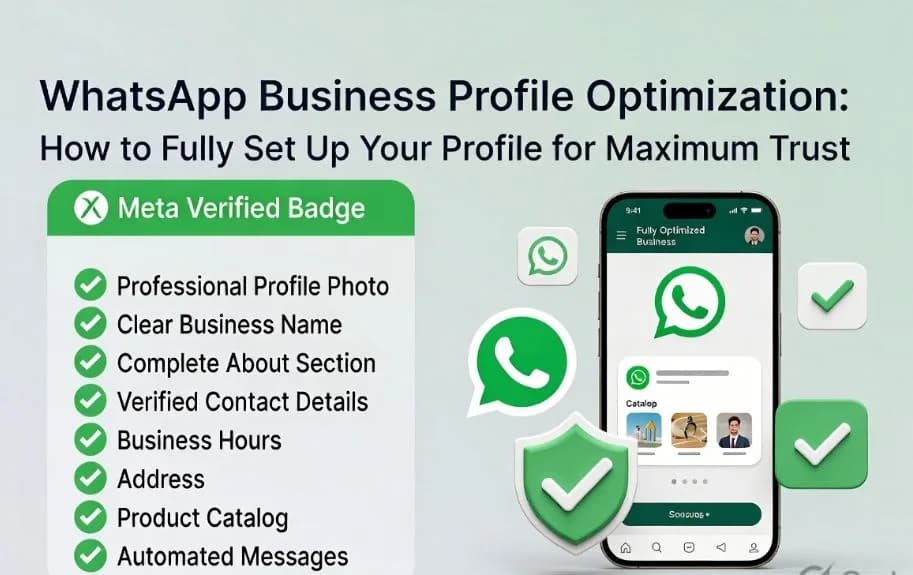
Your WhatsApp Business profile is not just a contact card — it is your digital storefront.
A strong profile helps you:
- Build instant trust with new customers
- Improve message response rates
- Increase conversion from chat to sale
- Establish brand identity across platforms
On the other hand, missing or inconsistent information can make your business look unreliable.
Step-by-Step Guide to WhatsApp Business Profile Optimization
1. Choose a Professional Profile Picture
::contentReference[oaicite:0]{index=0}
- Use a high-quality square image (at least 640x640 px)
- Businesses should use a clean logo
- Personal brands can use a professional headshot
- Avoid cluttered or low-resolution images
A clear profile picture builds instant recognition.
2. Set a Clear Business Name
- Use your official brand name only
- Avoid keyword stuffing or extra symbols
- Keep it short and professional
- Ensure consistency across all platforms
A consistent name improves trust and brand recall.
3. Write a Strong Business Description
Your “About” section should clearly explain:
- What you do
- What value you provide
- A simple call-to-action
Example:
“Premium digital solutions | Fast support | Helping businesses grow online”
4. Add Complete Contact Information
- Use a professional email address
- Add your official website
- Ensure phone number is verified
- Link social media accounts if available
This improves transparency and trust.
5. Set Accurate Business Hours
Clearly define:
- Working days
- Opening and closing hours
- Auto-replies for off-hours
This helps manage customer expectations.
6. Add a Physical Address (If Applicable)
- Include full address for local businesses
- Helps customers verify legitimacy
- Improves local search visibility
7. Choose the Right Business Category
Select the most relevant Meta category such as:
- Shopping & Retail
- Professional Services
- Health & Beauty
- Education
Correct categorization improves discoverability.
8. Build a Product Catalog
::contentReference[oaicite:1]{index=1}
- Add product images with clear pricing
- Include descriptions and links
- Sync with Shopify or WooCommerce if possible
- Feature top products in your profile
This directly boosts conversions.
9. Set Up Automated Messages
Automation improves professionalism:
- Greeting message for new users
- Away message for offline hours
- Quick replies for FAQs
- Labels for chat organization
This ensures faster and consistent communication.
10. Get Verified for Maximum Trust
- Complete Meta Business verification
- Submit documents like GST, PAN, or business license
- Apply via WhatsApp Manager or BSP
- Maintain consistency across all platforms
Verification significantly increases customer confidence.
Advanced Trust-Building Tips for 2026
- Keep branding consistent across all platforms
- Use high-quality visuals everywhere
- Maintain fast response times (under 10 minutes)
- Share policies clearly (refund, shipping, etc.)
- Collect and showcase customer reviews
- Monitor engagement using analytics tools
The Impact of a Fully Optimized Profile
A well-optimized WhatsApp Business profile leads to:
- Higher customer trust
- Better engagement rates
- More qualified leads
- Increased conversion rates
- Stronger brand reputation
Conclusion
Your WhatsApp Business profile is often the first impression customers have of your brand. Optimizing it properly in 2026 is no longer optional — it is essential for growth.
Start with the basics, improve consistency, and move toward verification for maximum impact.
With duochat, you can turn every profile visit into a potential customer conversation.